Showing posts with label Android Example. Show all posts

Thursday, July 14, 2011

Android #10: Working with Android Services

Activities and Content Providers are short lived components and can be shut down any time whereas Services are designed to keep running if required as an independent Activity. For example, they can check for any updates on RSS feed or playing background music even if the controlling Activity is no longer operating. So in order to create a application that runs on background of other current activities, one need to create a service.

Services are of two categories

  1. Unbound Services – They are services that run in background indefinitely. That is, unbound service is one which gets initiated when an activity is started and continues to run even when that activity is closed.

  2. Bound Services – They are services that run in background at the lifespan of a calling activity. That is, bound service is one which gets initiated when an activity is started and destroys or its life span ends when that activity is closed.
Working with Unbound Services:

Here is an example of unbound service that will be initiated by an application activity and even after that activity is closed, will find the service to be running in background.


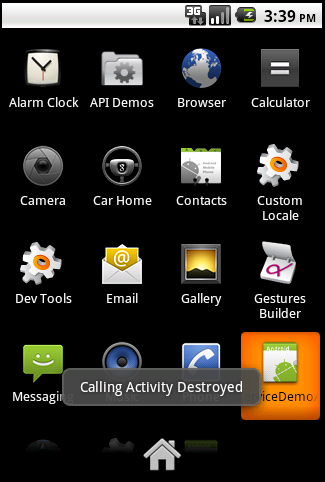


layout/main.xml
<?xml version="1.0" encoding="utf-8"?>

<LinearLayout xmlns:android="http://schemas.android.com/apk/res/android"

android:orientation="vertical" android:layout_width="fill_parent"

android:layout_height="fill_parent" android:gravity="center">

<TextView android:layout_width="fill_parent"

android:layout_height="wrap_content" android:text="Activity UnBound Services Demo"

android:textSize="20sp" android:padding="10dp" />

<Button android:layout_width="fill_parent"

android:layout_height="wrap_content" android:id="@+id/buttonStart"

android:text="Create/Start UnBound Service"></Button>

<Button android:layout_width="fill_parent"

android:layout_height="wrap_content" android:text="Stop UnBound Service" android:id="@+id/buttonStop">
</Button>

</LinearLayout>

SimpleActivityUnBoundService.java
package in.satworks.android.samples.service;import android.app.Service;

import android.content.Intent;

import android.os.IBinder;

import android.widget.Toast;

public class SimpleActivityUnBoundService extends Service {
 @Override

public IBinder onBind(Intent arg0) { return null;

}

@Override
// Service Created - Called only one time when when the service is first created

public void onCreate() {super.onCreate();

Toast.makeText(this, "Service onCreate called: Service Created", 3).show();}

@Override
// Service Stopped - Called when the service is destroyed

public void onDestroy() {super.onDestroy();

Toast.makeText(this, "Service onDestroy called: Service Stopped", 3).show();}

@Override
// Service Started - Called every time when user tries to start the same service

public void onStart(Intent intent, int startId) {super.onStart(intent, startId);

Toast.makeText(this, "Service onStart called: Service Started", 3).show();}

}

ServiceDemoActivity.java
package in.satworks.android.samples.activity;
import in.satworks.android.samples.R;
import in.satworks.android.samples.service.SimpleActivityUnBoundService;

import android.app.Activity;

import android.content.Intent;

import android.os.Bundle;

import android.view.View;

import android.view.View.OnClickListener;

import android.widget.Button;

import android.widget.Toast;

public class ServiceDemoActivity extends Activity implements OnClickListener{

Button buttonStart, buttonStop;

@Override

public void onCreate(Bundle savedInstanceState) {

super.onCreate(savedInstanceState);

setContentView(R.layout.main);

buttonStart = (Button) findViewById(R.id.buttonStart);

buttonStop = (Button) findViewById(R.id.buttonStop);

buttonStart.setOnClickListener(this);

buttonStop.setOnClickListener(this);

}

@Override
public void onClick(View v) {

switch (v.getId()) {

case R.id.buttonStart:

startService(new Intent(this, SimpleActivityUnBoundService.class));

break;

case R.id.buttonStop:

stopService(new Intent(this, SimpleActivityUnBoundService.class));

break;

}

}

@Override protected void onDestroy() {

super.onDestroy();

Toast.makeText(this, "Calling Activity Destoyed", 3).show();

}

}

values/strings.xml
<?xml version="1.0" encoding="utf-8"?>

<resources>

<string name="app_name">ServiceDemoApp</string>

</resources>

AndroidManifest.xml
<?xml version="1.0" encoding="utf-8"?>

<manifest xmlns:android="http://schemas.android.com/apk/res/android"

package="in.satworks.android.samples" android:versionCode="1"

android:versionName="1.0">
<application android:icon="@drawable/icon" android:label="@string/app_name">
<activity android:name=".activity.ServiceDemoActivity" android:label="@string/app_name">

<intent-filter>

<action android:name="android.intent.action.MAIN" />

<category android:name="android.intent.category.LAUNCHER" />

</intent-filter>

</activity>

<service android:enabled="true" android:name=".service.SimpleActivityUnBoundService" />

</application>

<uses-sdk android:minSdkVersion="8" />

</manifest>

Working with Bound Services:

Here is an example of bound service that will be initiated by an application activity and its lifecycle ends when the activity is closed.


layout/main.xml
<?xml version="1.0" encoding="utf-8"?>

<LinearLayout xmlns:android="http://schemas.android.com/apk/res/android"

android:orientation="vertical" android:layout_width="fill_parent"

android:layout_height="fill_parent" android:gravity="center">

<TextView android:layout_width="fill_parent"

android:layout_height="wrap_content" android:text="Activity Bound Services Demo"

android:textSize="20sp" android:padding="10dp" />

<Button android:layout_width="fill_parent"

android:layout_height="wrap_content" android:id="@+id/buttonStart"

android:text="Start"></Button>

</LinearLayout>

SimpleActivityBoundService.java
package in.satworks.android.samples.service;import android.app.Service;

import android.content.Intent;

import android.os.IBinder;

import android.widget.Toast;

public class SimpleActivityBoundService extends Service { @Override

public IBinder onBind(Intent arg0) {

return null;

}

@Override // Service Created - Called only one time when when the service is first created

public void onCreate() {

super.onCreate();

Toast.makeText(this, "Service onCreate called: Service Created", 3).show();

}

@Override // Service Stopped - Called when the service is destroyed

public void onDestroy() {

super.onDestroy();

Toast.makeText(this, "Service onDestroy called: Service Stopped", 3).show();

}

}

ServiceDemoActivity.java
package in.satworks.android.samples.activity;import in.satworks.android.samples.R;

import in.satworks.android.samples.service.SimpleActivityBoundService;

import android.app.Activity;

import android.content.Intent;

import android.os.Bundle;

import android.view.View;

import android.view.View.OnClickListener;

import android.widget.Button;

import android.widget.Toast;

public class ServiceDemoActivity extends Activity implements OnClickListener{
Button buttonStart;

@Override public void onCreate(Bundle savedInstanceState) {

super.onCreate(savedInstanceState);

setContentView(R.layout.main);

buttonStart = (Button) findViewById(R.id.buttonStart);

buttonStart.setOnClickListener(this);

}

@Override public void onClick(View v) {

switch (v.getId()) {

case R.id.buttonStart:

bindService(new Intent(this, SimpleActivityBoundService.class), null, BIND_AUTO_CREATE);

break;

}

}

@Override protected void onDestroy() {

super.onDestroy();

Toast.makeText(this, "Calling Activity Destroyed", 3).show();

}

}

values/strings.xml
<?xml version="1.0" encoding="utf-8"?>

<resources>

<string name="app_name">ServiceDemoApp</string>

</resources>

AndroidManifest.xml
<?xml version="1.0" encoding="utf-8"?>

<manifest xmlns:android="http://schemas.android.com/apk/res/android"

package="in.satworks.android.samples" android:versionCode="1"

android:versionName="1.0">
<application android:icon="@drawable/icon" android:label="@string/app_name">
<activity android:name=".activity.ServiceDemoActivity" android:label="@string/app_name">

<intent-filter>

<action android:name="android.intent.action.MAIN" />

<category android:name="android.intent.category.LAUNCHER" />

</intent-filter>

</activity>

<service android:enabled="true" android:name=".service.SimpleActivityBoundService" />

</application>

<uses-sdk android:minSdkVersion="8" />

</manifest>

Thursday, December 23, 2010

Android #9: Working with Android Intents - Part 4

Refer the previous post to get background on Intents - http://satworks.blogspot.com/2010/12/android-6-working-with-android-intents.html

Explicit Intents with return example: This example demonstrates the inter-activity communication and will show on invoking user defined custom activities from one activity but instead of passing the control to the invoked activity, will stay on the current invoking activity with values updated from invoked activity


layout/main.xml
<?xml version="1.0" encoding="utf-8"?>
<LinearLayout xmlns:android="http://schemas.android.com/apk/res/android"
android:orientation="vertical" android:layout_width="fill_parent"
android:layout_height="fill_parent">
<TextView android:id="@+id/btnMsgId" android:layout_width="fill_parent"
android:layout_height="wrap_content" android:text="@string/msg" />
<Button android:id="@+id/btnRtnId" android:layout_width="fill_parent"
android:layout_height="wrap_content" android:text="@string/invokeRtnBtn" />
</LinearLayout>
BaseInvokingActivity.java
package in.satworks.android.samples.activity;

import android.app.Activity;
import android.content.Intent;
import android.os.Bundle;
import android.view.View;
import android.view.View.OnClickListener;
import android.widget.Button;
import android.widget.Toast;

public class BaseInvokingActivity extends Activity {
/** Called when the activity is first created. */
@Override
public void onCreate(Bundle savedInstanceState) {
super.onCreate(savedInstanceState);
setContentView(R.layout.main);
// Invoke other activity and Return
Button invokeRtnBtn = (Button) findViewById(R.id.btnRtnId);
invokeRtnBtn.setOnClickListener(new OnClickListener() {
@Override
public void onClick(View arg0) {
Intent explicitIntent = new Intent(BaseInvokingActivity.this,
OtherInvokedActivity.class);
explicitIntent.putExtra("FromBaseInvokingActivity",
"Initial Value from FromBaseInvokingActivity");
startActivityForResult(explicitIntent, 1);
}
});
}
/** Called when an activity called by using startActivityForResult finishes. */
@Override
public void onActivityResult(int requestCode, int resultCode, Intent data) {
Bundle extras = data.getExtras();
String returnVal = (String) extras.get("OtherInvokedActivity");
Toast.makeText(BaseInvokingActivity.this, returnVal, Toast.LENGTH_SHORT)
.show();
}
}
OtherInvokedActivity.java
package in.satworks.android.samples.activity;

import android.app.Activity;
import android.content.Intent;
import android.os.Bundle;

public class OtherInvokedActivity extends Activity {
/** Called when the activity is first created. */
@Override
public void onCreate(Bundle savedInstanceState) {
super.onCreate(savedInstanceState);
setContentView(R.layout.main);
Intent intent=getIntent();
Bundle extras=intent.getExtras();
String val=(String)extras.get("FromBaseInvokingActivity");
Intent modifiedIntent=new Intent();
modifiedIntent.putExtra("OtherInvokedActivity", val+":\nNow modified with this text included from OtherInvokedActivity");
setResult(1, modifiedIntent);
finish();
}
}
values/strings.xml
<?xml version="1.0" encoding="utf-8"?>
<resources>
<string name="app_name">ExplicitIntentsApp</string>
<string name="msg">BaseInvokingActivity!</string>
<string name="otherMsg">OtherInvokedActivity!</string>
<string name="invokeRtnBtn">Invoke Other Activity and Return</string>
</resources>
AndroidManifest.xml
<?xml version="1.0" encoding="utf-8"?>
<manifest xmlns:android="http://schemas.android.com/apk/res/android"
package="in.satworks.android.samples.activity" android:versionCode="1"
android:versionName="1.0">
<application android:icon="@drawable/icon" android:label="@string/app_name">
<activity android:name=".BaseInvokingActivity" android:label="@string/app_name">
<intent-filter>
<action android:name="android.intent.action.MAIN" />
<category android:name="android.intent.category.LAUNCHER" />
</intent-filter>
</activity>
<activity android:label="@string/app_name" android:name=".OtherInvokedActivity"></activity>
</application>
<uses-sdk android:minSdkVersion="8" />
</manifest>

Monday, December 20, 2010

Android #8: Working with Android Intents - Part 3

Refer the previous post to get background on Intents - http://satworks.blogspot.com/2010/12/android-6-working-with-android-intents.html

Explicit Intents example: This example demonstrates the inter-activity communication and will show on invoking user defined custom activities from one activity


layout/main.xml
<?xml version="1.0" encoding="utf-8"?>
<LinearLayout xmlns:android="http://schemas.android.com/apk/res/android"
android:orientation="vertical" android:layout_width="fill_parent"
android:layout_height="fill_parent">
<TextView android:layout_width="fill_parent"
android:layout_height="wrap_content" android:text="@string/msg" />
<Button android:id="@+id/btnId" android:layout_width="fill_parent"
android:layout_height="wrap_content" android:text="@string/invokeBtn" />
</LinearLayout>
layout/otherinvoked.xml
<?xml version="1.0" encoding="utf-8"?>
<LinearLayout xmlns:android="http://schemas.android.com/apk/res/android"
android:orientation="vertical" android:layout_width="fill_parent"
android:layout_height="fill_parent">
<TextView android:id="@+id/otherMsgId" android:layout_width="fill_parent"
android:layout_height="wrap_content" android:text="@string/otherMsg" />
</LinearLayout>
BaseInvokingActivity.java
package in.satworks.android.samples.activity;
import android.app.Activity;
import android.content.Intent;
import android.os.Bundle;
import android.view.View;
import android.view.View.OnClickListener;
import android.widget.Button;

public class BaseInvokingActivity extends Activity {
/** Called when the activity is first created. */
@Override
public void onCreate(Bundle savedInstanceState) {
super.onCreate(savedInstanceState);
setContentView(R.layout.main);
// Invoke other activity
Button invokeBtn=(Button)findViewById(R.id.btnId);
invokeBtn.setOnClickListener(new OnClickListener() {
@Override
public void onClick(View arg0) {
Intent explicitIntent=new Intent(BaseInvokingActivity.this, OtherInvokedActivity.class);
explicitIntent.putExtra("FromBaseInvokingActivity", "Value from FromBaseInvokingActivity");
startActivity(explicitIntent);
}
});
}
}
OtherInvokedActivity.java
package in.satworks.android.samples.activity;

import android.app.Activity;
import android.content.Intent;
import android.os.Bundle;
import android.widget.TextView;

public class OtherInvokedActivity extends Activity {
/** Called when the activity is first created. */
@Override
public void onCreate(Bundle savedInstanceState) {
super.onCreate(savedInstanceState);
setContentView(R.layout.otherinvoked);
Intent intent=getIntent();
Bundle extras=intent.getExtras();
String val=(String)extras.get("FromBaseInvokingActivity");
TextView txtView=(TextView)findViewById(R.id.otherMsgId);
txtView.setText("OtherInvokedActivity: "+val);
}
}
values/strings.xml
<?xml version="1.0" encoding="utf-8"?><resources>
<string name="app_name">ExplicitIntentsApp</string>
<string name="msg">BaseInvokingActivity!</string>
<string name="otherMsg">OtherInvokedActivity!</string>
<string name="invokeBtn">Invoke Other Activity</string>
</resources>
AndroidManifest.xml
<?xml version="1.0" encoding="utf-8"?>
<manifest xmlns:android="http://schemas.android.com/apk/res/android"
package="in.satworks.android.samples.activity" android:versionCode="1"
android:versionName="1.0">
<application android:icon="@drawable/icon" android:label="@string/app_name">
<activity android:name=".BaseInvokingActivity" android:label="@string/app_name">
<intent-filter>
<action android:name="android.intent.action.MAIN" />
<category android:name="android.intent.category.LAUNCHER" />
</intent-filter>
</activity>
<activity android:label="@string/app_name" android:name=".OtherInvokedActivity"></activity>
</application>
<uses-sdk android:minSdkVersion="8" />
</manifest>

Android #7: Working with Android Intents - Part 2

Refer the previous post to get background on Intents - http://satworks.blogspot.com/2010/12/android-6-working-with-android-intents.html

Implicit Intents example: Following example demonstrates the inter-activity communication and will show on invoking some of the built-in Android activities from one activity


layout/main.xml
<?xml version="1.0" encoding="utf-8"?>
<LinearLayout xmlns:android="http://schemas.android.com/apk/res/android"
android:orientation="vertical" android:layout_width="fill_parent"
android:layout_height="fill_parent">
<TextView android:layout_width="fill_parent"
android:layout_height="wrap_content" android:text="@string/msg" />
<Button android:id="@+id/btnDialId" android:layout_width="fill_parent"
android:layout_height="wrap_content" android:text="@string/btnDialTxt"
android:gravity="right|center_vertical" />
<Button android:id="@+id/btnCallId" android:layout_width="fill_parent"
android:layout_height="wrap_content" android:text="@string/btnCallTxt"
android:gravity="right|center_vertical" />
<Button android:id="@+id/btnSMSId" android:layout_width="fill_parent"
android:layout_height="wrap_content" android:text="@string/btnSMSTxt"
android:gravity="right|center_vertical" />
<Button android:id="@+id/btnSearchId" android:layout_width="fill_parent"
android:layout_height="wrap_content" android:text="@string/btnSearchTxt"
android:gravity="right|center_vertical" />
<Button android:id="@+id/btnBrowseId" android:layout_width="fill_parent"
android:layout_height="wrap_content" android:text="@string/btnBrowseTxt"
android:gravity="right|center_vertical" />
<Button android:id="@+id/btnGoogleMapId" android:layout_width="fill_parent"
android:layout_height="wrap_content" android:text="@string/btnGoogleMapTxt"
android:gravity="right|center_vertical" />
<Button android:id="@+id/btnViewContactsId"
android:layout_width="fill_parent" android:layout_height="wrap_content"
android:text="@string/btnViewContactsTxt" android:gravity="right|center_vertical" />
</LinearLayout>

ImplicitIntentsActivity.java
package in.satworks.android.samples.activity;

import android.app.Activity;
import android.app.SearchManager;
import android.content.Intent;
import android.net.Uri;
import android.os.Bundle;
import android.provider.ContactsContract;
import android.view.View;
import android.view.View.OnClickListener;
import android.widget.Button;

public class ImplicitIntentsActivity extends Activity {
/** Called when the activity is first created. */
@Override
public void onCreate(Bundle savedInstanceState) {
super.onCreate(savedInstanceState);
setContentView(R.layout.main);
// To Dial a number
launchDialer();
// To Call a Number
// Requires android.permission.CALL_PHONE
callNumber();
// To SMS a Number
launchSMS();
// To perform local search
performLocalSearch();
// To open browser with URL
launchBrowser();
// To launch Google Maps
showGoogleMap();
// To View existing contacts stored in phone
showContacts();
}

// To View existing contacts stored in phone
private void showContacts() {
Button viewContacts = (Button) findViewById(R.id.btnViewContactsId);
viewContacts.setOnClickListener(new OnClickListener() {
@Override
public void onClick(View v) {
Intent contacts = new Intent();
contacts.setAction(android.content.Intent.ACTION_VIEW);
contacts.setData(ContactsContract.Contacts.CONTENT_URI);
startActivity(contacts);
}
});

}

// To launch Google Maps
private void showGoogleMap() {
Button googleMapBtn = (Button) findViewById(R.id.btnGoogleMapId);
googleMapBtn.setOnClickListener(new OnClickListener() {
@Override
public void onClick(View v) {
Intent intent = new Intent(Intent.ACTION_VIEW, Uri
.parse("geo:13.05,80.20"));
startActivity(intent);
}
});
}

// Open a browser window to the URL specified.
private void launchBrowser() {
Button browseBtn = (Button) findViewById(R.id.btnBrowseId);
browseBtn.setOnClickListener(new OnClickListener() {
@Override
public void onClick(View v) {
Intent intent = new Intent(Intent.ACTION_VIEW, Uri
.parse("http://www.android.com"));
startActivity(intent);
}
});
}

// Perform local search
private void performLocalSearch() {
Button searchBtn = (Button) findViewById(R.id.btnSearchId);
searchBtn.setOnClickListener(new OnClickListener() {
@Override
public void onClick(View v) {
Intent intent = new Intent(Intent.ACTION_SEARCH);
intent.putExtra(SearchManager.QUERY, "Test");
startActivity(intent);
}
});
}

// To launch SMS
private void launchSMS() {
Button smsBtn = (Button) findViewById(R.id.btnSMSId);
smsBtn.setOnClickListener(new OnClickListener() {
@Override
public void onClick(View v) {
Intent intent = new Intent(Intent.ACTION_SENDTO, Uri
.parse("sms:123456789"));
intent.putExtra("sms_body", "Test SMS message.....");
startActivity(intent);
}
});
}

// Calls the entered phone number.
private void callNumber() {
Button callBtn = (Button) findViewById(R.id.btnCallId);
callBtn.setOnClickListener(new OnClickListener() {
@Override
public void onClick(View v) {
Intent intent = new Intent(Intent.ACTION_CALL, Uri
.parse("tel:123456789"));
startActivity(intent);
}
});
}

// Dials (but does not actually initiate the call) the number given
private void launchDialer() {
Button dialBtn = (Button) findViewById(R.id.btnDialId);
dialBtn.setOnClickListener(new OnClickListener() {
@Override
public void onClick(View v) {
Intent intent = new Intent(Intent.ACTION_DIAL, Uri
.parse("tel:123456789"));
startActivity(intent);
}
});
}
}

values/strings.xml
<?xml version="1.0" encoding="utf-8"?>
<resources>
<string name="app_name">ImplicitIntentsApp</string>
<string name="msg">ImplicitIntentsActivity! \nTry out few of the predefined intents\n</string>
<string name="btnDialTxt">Launch Dialer</string>
<string name="btnCallTxt">Launch Call</string>
<string name="btnSMSTxt">Launch SMS</string>
<string name="btnSearchTxt">Launch Search</string>
<string name="btnBrowseTxt">Launch Browser</string>
<string name="btnGoogleMapTxt">Launch Google Map</string>
<string name="btnViewContactsTxt">Launch Phone Contacts</string>
</resources>

AndroidManifest.xml
<?xml version="1.0" encoding="utf-8"?>
<manifest xmlns:android="http://schemas.android.com/apk/res/android"
package="in.satworks.android.samples.activity" android:versionCode="1"
android:versionName="1.0">
<application android:icon="@drawable/icon" android:label="@string/app_name">
<activity android:name=".ImplicitIntentsActivity"
android:label="@string/app_name">
<intent-filter>
<action android:name="android.intent.action.MAIN" />
<category android:name="android.intent.category.LAUNCHER" />
</intent-filter>
<intent-filter>
<action android:name="android.intent.action.VIEW" />
<category android:name="android.intent.category.DEFAULT" />
</intent-filter>
</activity>
</application>
<uses-sdk android:minSdkVersion="8" />
<uses-permission android:name="android.permission.CALL_PHONE"/>
</manifest>

Android #6: Working with Android Intents - Part 1

Android Intents are used for event notifications thus notifying applications about an event through passing messages between components/activities. In simple words, intents are messages that are passed between components. An Intent object holds the content of the message. For example, notifies when a SMS arrives, or SD card inserted into the device etc. Any component that wants to invoke another component has to express only through “intents” to perform a job.

Intents are typically used to activate components such as activities, services, and broadcast receivers. That is for launching an activity, broadcast messages for broadcast receivers, start a service/bind a service to communicate with any background service. Intents typically needs the basic information’s such as action to be performed and data to operate on.

  1. For activating the activity component, intent object holding the message content is passed to startActivity or startActivityForResult operations
  2. For activating the service component, intent object holding the message content is passed to startService operation
  3. For initiating a broadcast, intent object holding the message content is passed to sendBroadcast, sendOrderedBroadcast, and sendStickyBroadcast operations

Communication between components is achieved through intents. There are two primary form of intents namely

  1. Implicit Intents: Intents that do not name or specify a target component are termed as Implicit Intents. It is left to the platform to find an appropriate component to respond to the intent. Android platform resolves as to which component is most suitable to respond to such implicit intents using intent filters configured within Android Manifest file.
  2. Explicit Intents: Unlike Implicit Intents, you actually specify the target component that is required to respond to the intent.
Typical Intents Usage:

  • Inter-Activity (Activity-to-Activity) Communication: Here we can use Intents to pass information between activities wherever we have a need for creating multiple activities, and there exists a need for communicating/passing information between them. The activities can be implicit or explicit activities
  • Activity-Service Communication: Here we can use Intents to make a service perform a information update in an activity.
Examples:

Thought would create three different examples to show on inter-activity (activity-to-activity) communication in separate posts.

  1. Implicit Intents example: This example demonstrates the inter-activity communication and will show on invoking some of the built-in Android activities from one activity (http://satworks.blogspot.com/2010/12/android-7-working-with-android-intents.html)
  2. Explicit Intents example: This example demonstrates the inter-activity communication and will show on invoking user defined custom activities from one activity (http://satworks.blogspot.com/2010/12/refer-previous-post-to-get-background.html)
  3. Explicit Intents with return example: This example demonstrates the inter-activity communication and will show on invoking user defined custom activities from one activity but instead of passing the control to the invoked activity, will stay on the current invoking activity with values updated from invoked activity (http://satworks.blogspot.com/2010/12/android-9-working-with-android-intents.html)

Sunday, December 12, 2010

Android #5: Working with Custom Fonts

All Android devices comes with a standard collection of fonts namely Droid Sans, Droid Sans Mono, and Droid Serif as they are designed to be optimal for mobile displays. But there might be a need for using custom fonts for some special purposes say for example, Indic Tamil fonts which Android doesn’t support currently. So as a workaround in getting such fonts for a special need, we can go with using custom fonts features that Android supports.

Following example illustrates on using custom fonts in Android application


layout/main.xml:

<?xml version="1.0" encoding="utf-8"?>
<LinearLayout xmlns:android="http://schemas.android.com/apk/res/android"
android:orientation="vertical" android:layout_width="fill_parent"
android:layout_height="fill_parent">
<TextView android:layout_width="fill_parent"
android:layout_height="wrap_content" android:textSize="27px"
android:text="@string/msg" />
<!-- Line -->
<View android:layout_width="fill_parent" android:layout_height="2dp"
android:background="#99CCFF" />
<TextView android:id="@+id/tamilTxtId" android:layout_width="fill_parent"
android:layout_height="wrap_content" android:textSize="27px"
android:textColor="#CDE472" />
<TextView android:id="@+id/txtId" android:layout_width="fill_parent"
android:layout_height="wrap_content" android:text="@string/engFont"
android:textSize="27px" android:textColor="#CDE472" />
</LinearLayout>

CustomFontActivity.java:

package in.satworks.android.samples.activity;import android.app.Activity;
import android.graphics.Typeface;
import android.os.Bundle;
import android.widget.TextView;

public class CustomFontActivity extends Activity {
/** Called when the activity is first created. */
@Override
public void onCreate(Bundle savedInstanceState) {
super.onCreate(savedInstanceState);
setContentView(R.layout.main);
// Use ENGLISH font
Typeface face=Typeface.createFromAsset(getAssets(), "fonts/VLADIMIR.ttf">
TextView txtView=(TextView)findViewById(R.id.txtId);
txtView.setTypeface(face);
// Use TAMIL font
Typeface tamilFace=Typeface.createFromAsset(getAssets(), "fonts/Eltpan-n.ttf");
TextView tamilTxtView=(TextView)findViewById(R.id.tamilTxtId);
tamilTxtView.setText("1: \u0053\u00D6\u005D\u00EB \u0045\u005D\u00EB \u0053\u0081\u0054\u005D\u00EB");
tamilTxtView.setTypeface(tamilFace);
}
}
Custom Fonts:
Custom font files need to be dropped under assets folder of your android project
  • assets/fonts/VLADIMIR.TTF
  • assets/fonts/Eltpan-n.ttf

Tuesday, November 9, 2010

Android #4: Working with Android Resources - String Resources

Typically the res folder within any android project contains all external resources such as icons, images, layout, string etc under the respective sub-folders within. All resources are bound to the app in a way that we can change them without the need to recompile the app or change any app code. Unlike assets, android generates an ID in R.java file (auto-generated file) for each resource file using which they will be accessed within the code. Resources are very much useful when developing multi-lingual app supporting l10n and i18n.

Types of resources:
  • Strings, colors, arrays, dimensions are defined in res/values/ directory. Typical usage would be in Localization and Internationalization
  • Images are defined in res/drawable directory. Typical usage would be to put all the images or icons that an application needs
  • XML’s are defined in res/xml/ directory for xml files. Typical usage would be to hold custom data that can be used in application
  • Layout resources are defined in res/layout/ for declaring the views. Typical usage would be to construct the user interface of the activities
Following example illustrates accessing resources from res folder in a simple android project:


Working with String resources:

Android offers three types of string resources: Plain Strings, string formats and styled texts. Refer the following examples

layout/main.xml:
<?xml version="1.0" encoding="utf-8"?>
<LinearLayout xmlns:android="http://schemas.android.com/apk/res/android"
android:orientation="vertical" android:layout_width="fill_parent"
android:layout_height="fill_parent">

<!-- ResourceDemo -->
<TextView android:layout_width="fill_parent"
android:layout_height="wrap_content" android:text="@string/resPlainStrTxt"
android:textColor="#CDE472" />

<!-- Line -->
<View android:layout_width="fill_parent" android:layout_height="2dp"
android:background="#99CCFF" />

<TextView android:layout_width="fill_parent"
android:layout_height="wrap_content"
android:text="Plain String Resources - This is referenced from res/layout/main.xml"
android:textColor="#CDE472" />

<!-- Line -->
<View android:layout_width="fill_parent" android:layout_height="2dp"
android:background="#99CCFF" />

<TextView android:id="@+id/resPlainStrTxtId"
android:layout_width="fill_parent" android:layout_height="wrap_content"
android:textColor="#CDE472" />

<!-- Line -->
<View android:layout_width="fill_parent" android:layout_height="2dp"
android:background="#99CCFF" />

<TextView android:id="@+id/resFormattedStrTxtId"
android:layout_width="fill_parent" android:layout_height="wrap_content"
android:text="@string/resFormattedStrTxt" android:textColor="#CDE472" />

<!-- Line -->
<View android:layout_width="fill_parent" android:layout_height="2dp"
android:background="#99CCFF" />

<TextView android:id="@+id/resStyledStrTxtId" android:layout_width="fill_parent"
android:layout_height="wrap_content" android:textColor="#CDE472" android:text="@string/resStyledStrTxt"/>

<!-- Line -->
<View android:layout_width="fill_parent" android:layout_height="2dp"
android:background="#99CCFF" />

</LinearLayout>
ResourceDemoActivity.java
package in.satworks.android.samples.activity;

import android.app.Activity;
import android.os.Bundle;
import android.widget.TextView;

public class ResourceDemoActivity extends Activity {
private TextView resPlainStrTxtView=null;
private TextView resFormattedStrTxtView=null;
private TextView resStyledStrTxtView=null;
/** Called when the activity is first created. */
@Override
public void onCreate(Bundle savedInstanceState) {
super.onCreate(savedInstanceState);
setContentView(R.layout.main);

// Working with resources - Start
// Accessing Resources for Plain String contents from the resources folder - start
resPlainStrTxtView=(TextView)findViewById(R.id.resPlainStrTxtId);
resPlainStrTxtView.setText("Plain String Resources - This is referenced from code");
// Accessing Resources for Plain String contents from the resources folder - end

// Accessing Resources for Formatted String contents from the resources folder - start
resFormattedStrTxtView=(TextView)findViewById(R.id.resFormattedStrTxtId);
String formatStr=getString(R.string.resFormattedStrTxt);
String formattedStr=String.format(formatStr, "- \"This New Formatted Text\"");
resFormattedStrTxtView.setText(formattedStr);
// Accessing Resources for Formatted String contents from the resources folder - end

// Accessing Resources for Formatted String contents from the resources folder - start
resStyledStrTxtView=(TextView)findViewById(R.id.resStyledStrTxtId);
/* without styling
String styleStr=getString(R.string.resStyledStrTxt);
resStyledStrTxtView.setText(styleStr);
*/
// with styling
resStyledStrTxtView.setText(R.string.resStyledStrTxt);
// Accessing Resources for Formatted String contents from the resources folder - end
// Working with resources - End
}
}
values/strings.xml:
<?xml version="1.0" encoding="utf-8"?>
<resources>
<string name="app_name">ResourceDemo</string>
<string name="resPlainStrTxt">Plain String Resources - This is referenced from res/values/string.xml</string>
<string name="resFormattedStrTxt">Formatted String Resources - This is referenced from res/values/string.xml and is formatted with %1$s</string>
<string name="resStyledStrTxt">Styled String Resources - This is referenced from res/values/string.xml and is styled with \n<b>bold</b>, \n<u>underline</u> and \n<i>italics</i></string>
</resources>

Monday, November 8, 2010

Android #3: Working with Android Assets

Assuming that the user knows to create a HelloWorld kinda simple android app, we will look into understanding assets and means to access them within the android app.

Working with Assets:

Typically the asset folder within any android project that contains static files that one wishes to package within the application for deployment onto the device, read as a stream of bytes and accessed as just like the way we access the file system in java programming language. All files within this folder doesn’t generate an ID in R.java file (auto-generated file).

Following example illustrates accessing contents of a static file from the assets folder in a simple android project:


main.xml:

<?xml version="1.0" encoding="utf-8"?>
<LinearLayout xmlns:android="http://schemas.android.com/apk/res/android"
android:orientation="vertical" android:layout_width="fill_parent"
android:layout_height="fill_parent">

<!-- AssetDemo -->
<TextView android:id="@+id/assetTxtId" android:layout_width="fill_parent"
android:layout_height="wrap_content" android:textColor="#FFCC33" />

</LinearLayout>
AssetDemoActivity.java:

package in.satworks.android.samples.activity;

import java.io.BufferedReader;
import java.io.IOException;
import java.io.InputStream;
import java.io.InputStreamReader;

import android.app.Activity;
import android.content.res.AssetManager;
import android.os.Bundle;
import android.widget.TextView;

public class AssetDemoActivity extends Activity {
private TextView assetTxtView=null;
/** Called when the activity is first created. */
@Override
public void onCreate(Bundle savedInstanceState) {
super.onCreate(savedInstanceState);
setContentView(R.layout.main);

// Retrieving contents of a static file from the assets folder - start
assetTxtView=(TextView)findViewById(R.id.assetTxtId);
readAsset();
// Retrieving contents of a static file from the assets folder - end
}

private void readAsset()
{
//Get asset manager instance
AssetManager assetMngr=getAssets();
//Read contents from file under assets
try {
InputStream inStream=assetMngr.open("HelloAsset.txt");
BufferedReader bReader=new BufferedReader(new InputStreamReader(inStream));
String assetText="";
String asText="";
while((asText=bReader.readLine())!=null)
{
System.out.println("[AssetDemoActivity] [assetText] ***** "+assetText);
assetText=assetText+asText+"\n";
}
assetTxtView.setText(assetText);
bReader.close();
inStream.close();
} catch (IOException e) {
e.printStackTrace();
}
}
}

assets/HelloAsset.txt:
AssetDemo: This is referenced from assets/HelloAsset.txt